
I’ve tried a lot of AI logo generators over the past few years. Most of them promise “AI-powered” logos, but the truth is, many still just mix and match icons, fonts, and templates. Looka is one of the popular ones, and while it’s fast, the results often feel… familiar. Too familiar.
Recently, I started playing around with AnyLogo, and it’s different in a way that actually matters if you want to see that the latest AI technology has to offer in turns of logo and branding.
What Makes AnyLogo Stand Out
1. AI-Native, Not Template-Based
Most logo generators rely on pre-made icons, stock shapes, or font libraries. That means you end up with logos that look like everyone else’s. With AnyLogo, there’s no fixed icon library, no predefined templates. Every logo is generated from scratch.
In practice, that means:
- You see logos that aren’t just rearranged parts of other designs
- The styles feel more flexible and creative
- You get something that can actually feel like your brand
It’s subtle, but the difference between assembling a logo and creating one from “pure AI intelligence” is noticeable.
2. Multiple Ways to Generate Logos
AnyLogo doesn’t rely on pre-made templates or fixed layouts. Instead, it gives you several ways to generate logos:
- Pick a reference style — choose from proven aesthetics like minimalist, bold startup, luxury, etc.
- Upload a reference image — you can upload any design or style you like for inspiration. The AI will analyze it and extract the elements that best fit your brand to generate original logo designs.
- Just enter your brand name — skip everything else and let the AI generate unique logos from scratch.
This flexibility really changes the creative process. I could experiment with inspiration images or simply see what the AI came up with on its own. Both approaches felt natural and gave results that were original — something you rarely get with other AI logo tools.
3. Multi-Model Creativity
Most AI tools use a single model. The result? Variations of the same idea. AnyLogo runs multiple models behind the scenes, so each generated logo can feel completely different in approach, layout, and style.
It’s like having several designers give you concepts at once, instead of one person iterating over the same idea. The outputs felt less predictable and more exploratory.
4. Realistic Customization
Beyond generation, AnyLogo lets you tweak colors, fonts, icons, and layout freely. Unlike template-based systems, you’re not boxed into a particular look. You can refine without feeling like you’re bending a fixed template into something it wasn’t meant to be.
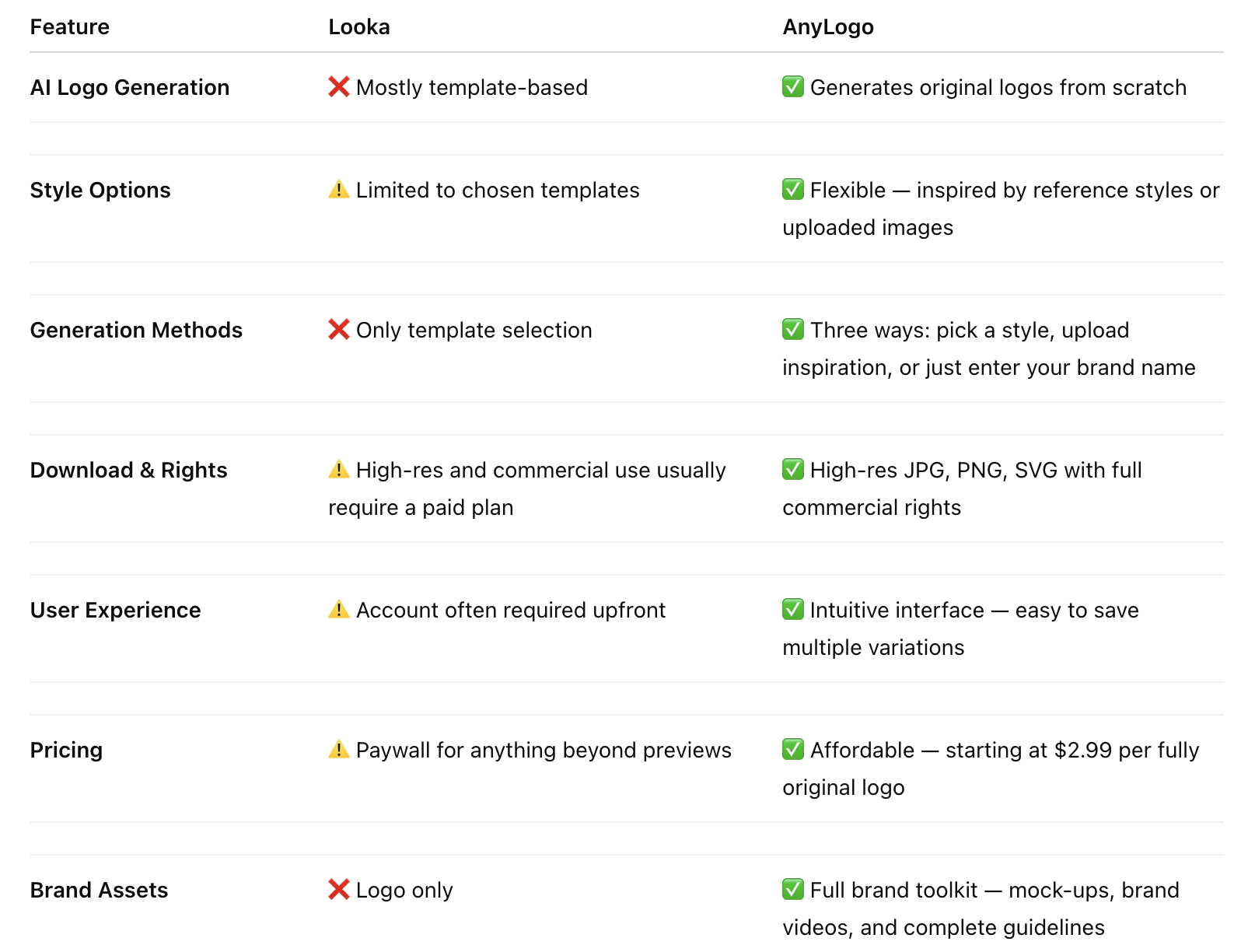
Quick Comparison: Looka vs AnyLogo
Bottom Line
If you just need a quick logo, Looka works fine. But if you want something that feels original, flexible, and a little smarter, AnyLogo stands out. The multiple ways to generate logos, the AI-native approach, and the subtle creative diversity make a real difference.
It doesn’t feel like a tool forcing you into templates — it feels like a creative assistant that actually gives you options you might not have thought of.